
Stop Giving Your Real Email to Every Website: A Smarter Sign-Up Workflow
Every time a website asks for your email, you make a small decision that can create long-term consequences. At first it feels harmless: one trial, one coupon, one download, one quick registration. But after enough casual sign-ups, your main inbox starts filling with marketing emails, follow-up reminders, and low-priority messages that make important email harder to manage.
A smarter approach is to stop treating every sign-up the same. Some accounts deserve your personal inbox. Others do not. This guide explains how to recognize the difference and how a temporary email workflow can help you reduce unnecessary exposure of your real email address.
You can also review our About Us page and Privacy Policy for more context about how TempMail Bank is intended to be used.
Why This Problem Grows Over Time
The problem is not usually one website. It is the accumulation of many small sign-ups. A newsletter here, a free tool there, a public forum, a trial platform, a quick resource download. Each one adds another place where your email address may be stored, reused, or targeted for future campaigns.
As this grows, your personal inbox becomes harder to control. Important messages compete with low-value updates, and your main email address becomes more widely exposed than it needs to be.
4 Warning Signs You Should Not Use Your Real Email

Before entering your personal email address, it helps to pause and look for a few simple warning signs. If several of these apply, a temporary inbox may be the better option.
- The site only offers a one-time download or short-term benefit.
- You are unsure whether you will ever use the account again.
- The sign-up page looks promotional or lead-focused.
- You do not want future updates going to your primary inbox.
These situations do not automatically mean the website is unsafe. They simply mean your personal inbox may not be the right inbox for that particular registration.
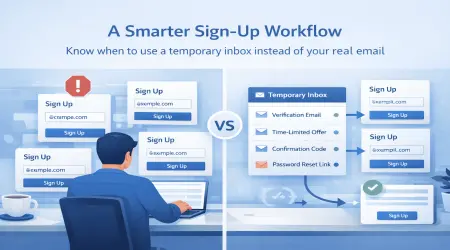
A Smarter Sign-Up Workflow
Instead of sharing your real email address everywhere by default, use a simple decision process:
- Ask whether the account is important and long term.
- If yes, use your personal email address.
- If no, ask whether the sign-up is temporary, low risk, or experimental.
- If yes, consider using a temporary inbox instead.
- Complete verification, finish the task, and keep your main inbox separate.
This approach gives you more control without making every registration complicated.
Where Temporary Email Fits Best
Temporary email is usually most helpful for short-term, low-priority, and routine online tasks. That includes:
- free trial sign-ups
- one-time verification emails
- public site registrations
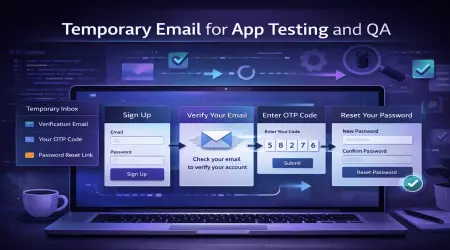
- testing app or form workflows
- temporary access to content or tools
In these cases, a temporary inbox can help you reduce future clutter in your personal email and avoid giving your primary address to every platform you try.
What Temporary Email Does Not Solve
Temporary email can help reduce spam exposure, but it is not a complete privacy solution. It does not replace strong passwords, careful browsing, or good account security habits. It is also not the right choice for every type of account.
You should generally avoid temporary email for:
- banking or financial accounts
- password recovery for services you rely on long term
- medical, legal, or highly sensitive communication
- important work or business accounts
- accounts tied to long-term identity or records
Important: Temporary inboxes may be public and are not intended for banking or sensitive accounts.
Checklist: Before You Enter an Email Address

Ask yourself these questions first:
- Will I still need this account next month?
- Would it matter if this inbox disappeared later?
- Do I want future promotions from this website?
- Will I ever need password recovery for this account?
- Is this registration routine and low risk, or important and long term?
If the answer points to short-term use, low priority, and no future recovery need, a temporary inbox may be a practical choice.
A Realistic Example
Suppose you want to access a free online tool that asks for email verification before letting you test a feature. You do not expect to keep using the tool, and you do not want future promotional campaigns sent to your primary inbox.
In that case, a temporary inbox can support a cleaner workflow:
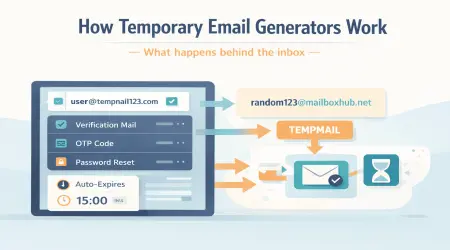
- Generate a temporary address
- Register for the tool
- Receive the verification email
- Complete access
- Keep your personal inbox reserved for higher-value communication
This is the kind of short-term use case where temporary email often makes the most sense.
Common Mistakes People Make
One of the biggest mistakes is using a temporary inbox for an account that later becomes important. Another is assuming that all temporary email services offer the same mailbox duration, attachment support, or privacy model.
It is also a mistake to think that temporary email should be used everywhere. The goal is not to replace your personal inbox completely. The goal is to use the right inbox for the right task.
How TempMail Bank Can Help
TempMail Bank is designed for short-term sign-ups, routine verification, and basic testing workflows. It can be useful when you want to avoid extra clutter in your primary inbox and handle low-priority registrations more efficiently.
To understand service expectations more clearly, you can also review our Terms and Conditions and Cookies Policy.
Final Thoughts
Giving your real email address to every website is rarely the best default habit. A smarter workflow is to decide whether the sign-up is important and long term or routine and short term. That one decision can make your inbox cleaner, easier to manage, and less exposed to low-value follow-up email.
For critical accounts, your personal inbox is still the better choice. But for trials, low-priority registrations, and short-term verification, a temporary inbox can be a practical way to stay more organized online.
FAQ
When should I use temporary email instead of my real email?
Temporary email is usually most useful for short-term sign-ups, trial access, low-risk verification, and testing workflows where long-term access is not important.
Should I use temporary email for important accounts?
No. Important accounts such as banking, password recovery, medical, legal, and long-term business services are better suited to your personal email address.
Can temporary email really reduce inbox clutter?
Yes. It can help separate low-priority registrations from your primary inbox, which reduces the chance of future promotional messages mixing with important email.
Is temporary email enough for full privacy?
No. Temporary email can reduce routine exposure of your email address, but it does not replace strong passwords, secure browsing habits, or other privacy and security practices.